I’ve tested Semrush, Ahrefs, and a couple of other keyword research tools over time: some premium SEO suites and even AI-based research platforms. Most of them are powerful, but they either come with a high cost or a learning curve.
Since I primarily plan content for the SaaS niche and agencies, I don’t just look at search volume. I care about context. The Intent. The real questions people are typing into Google.
I’m genuinely glad I came across the best free keyword research tool, Answer Socrates.
The tool focuses on question discovery, keyword clustering, and content planning, all in one place.
You enter a seed keyword, and it surfaces hundreds (sometimes thousands) of real questions around it. It helps you understand what people are actually searching for, not what you assume they’re searching for.
And all this for free.
How This Free Keyword Research Tool Caught My Attention: Answer Socrates Review
Whenever you hear “free SEO tool,” you automatically get a little skeptical.
That was me, too.
When I first heard about Answer Socrates, I assumed it would be like most free tools. Limited access, basic features, and all the useful stuff are locked behind a paid plan.
So I tested it on a few real projects.
And honestly, it turned out to be surprisingly practical, especially in the early research stage when you’re figuring out content direction.
With tools like AnswerThePublic, you don’t get clustering or search volume data in the free version. And that’s pretty common across most keyword tools. Real features usually come with a price tag.
But the interesting part here is that many of those features are actually available for free in Answer Socrates.
That’s what genuinely caught my attention.
How Answer Socrates Actually Works
Unlike tools like Ahrefs or Semrush, where you log in, set projects or configure things. Here, you just type in your seed keyword, select the country and language, and start.
For example, instead of typing something very specific like “best backlink management software for agencies,” I just typed “backlink management.”
Note: Always go for broad keywords. When you give the tool a broad topic, Answer Socrates does the hard work of breaking it into smaller subtopics and specific questions. You give the main idea, and it expands it into all possible angles.
The tool generated 102 questions and related terms within just a few seconds.
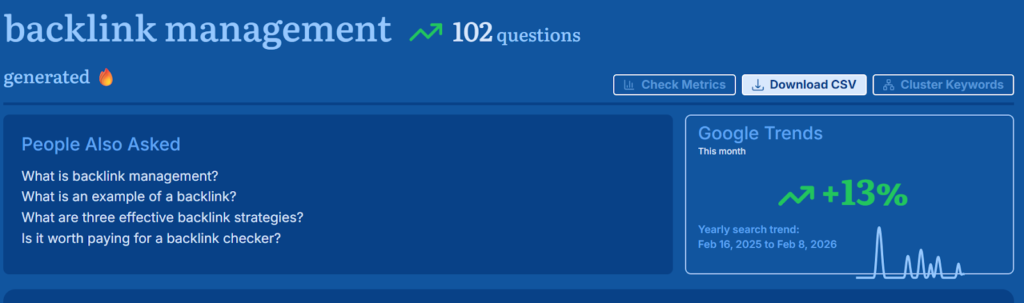
It also showed:
- Google Trends data (whether the topic is growing or declining compared to last year)
- People Also Ask questions
- Related searches
- Trending topics
- Even LSI-style related terms
And once you scroll down, there’s honestly no shortage of content ideas.
You can explore results in multiple ways:
- By prepositions (like “for,” “with,” “without”)
- By comparisons
- By past-related queries
- By alphabetically
- By question type
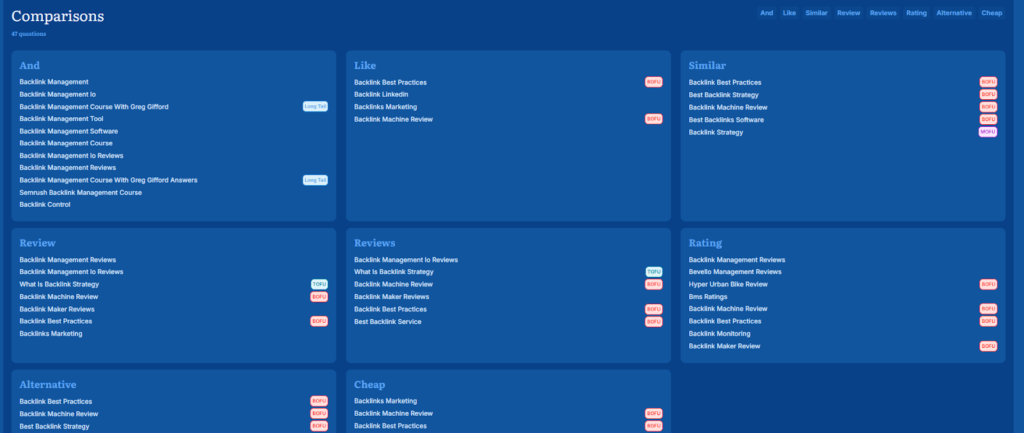
You also get social-media-related questions and recursive keyword ideas that help you dig deeper into the topic.
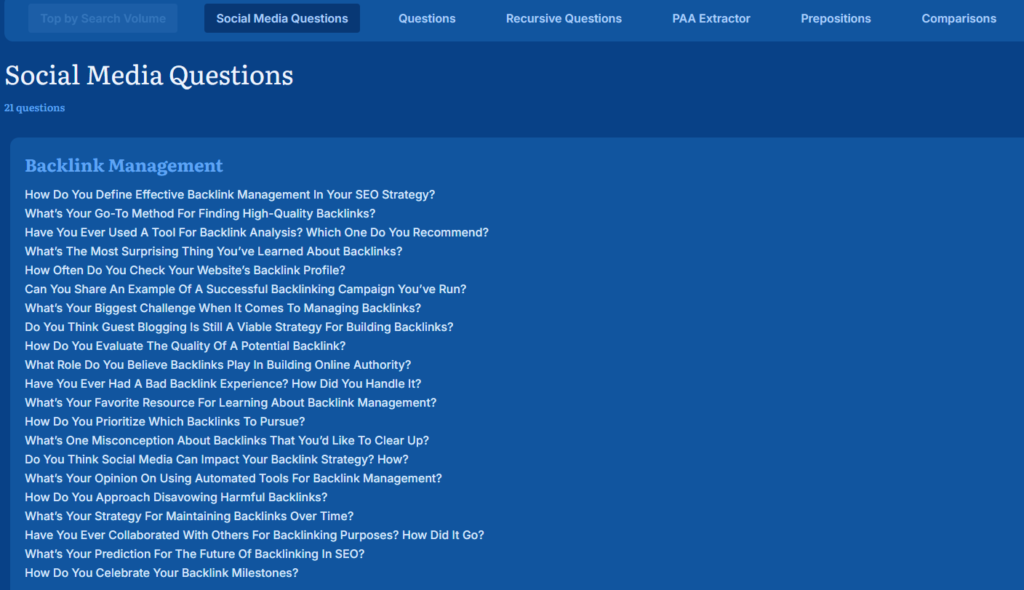
Note: You can export the results in a CSV file as well.
Understanding Search Intent Made Easier
The part that impressed me the most was that it clearly shows the funnel stage for each question. It tags questions as TOFU, MOFU, or BOFU. So you instantly know:
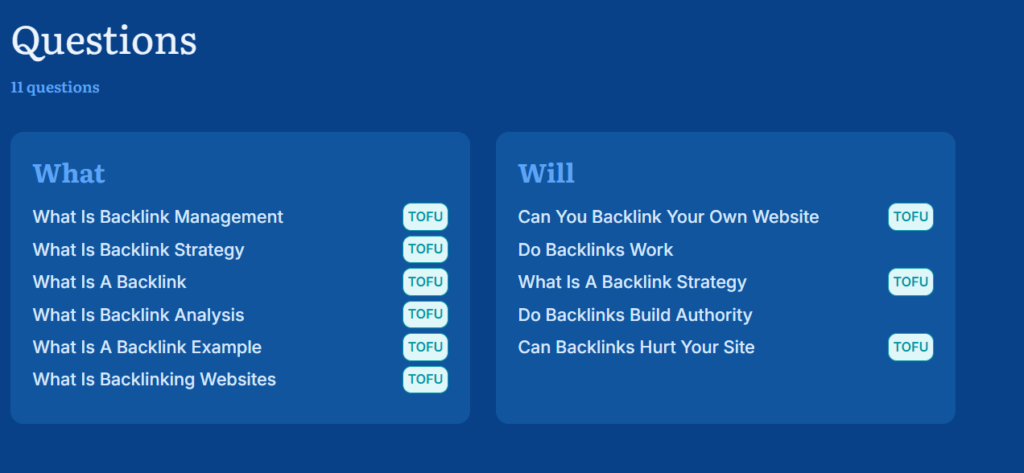
- Is the person just exploring the topic?
- Are they comparing options?
- Or are they ready to make a decision?
This makes content planning much easier. You’re not just collecting keywords. You’re understanding user intent. And based on that, you can plan blogs, landing pages, or comparison pages properly.
And all this data comes from places like Google Suggest, People Also Ask, and Google Trends. So you’re not guessing. You’re seeing real search behaviour.
Beyond Basic Keyword Research
While I initially started using Answer Socrates just for keyword discovery, I quickly realised the real value lies beyond question generation. Listing down some of the best core features that really helped me in my entire workflow:
1. Keyword Clustering Feature
One feature I didn’t expect to rely on as much was keyword clustering.
It does use a few credits (free sign-up option), but once it loads and you scroll down, you’ll see why it’s useful.
It basically groups your keywords into content buckets. It’s not perfect, but for a free tool, it does a solid job separating keywords by subtopics.
Here’s what I did:
I downloaded the CSV of my “backlink management” keywords and uploaded it into the clustering tool inside Answer Socrates.
Within a minute, everything was neatly grouped into proper topic clusters. And, I had a proper topical map ready to work with.
It also shows:
- Total search volume for each cluster
- Competition level
- Potential revenue based on CPC
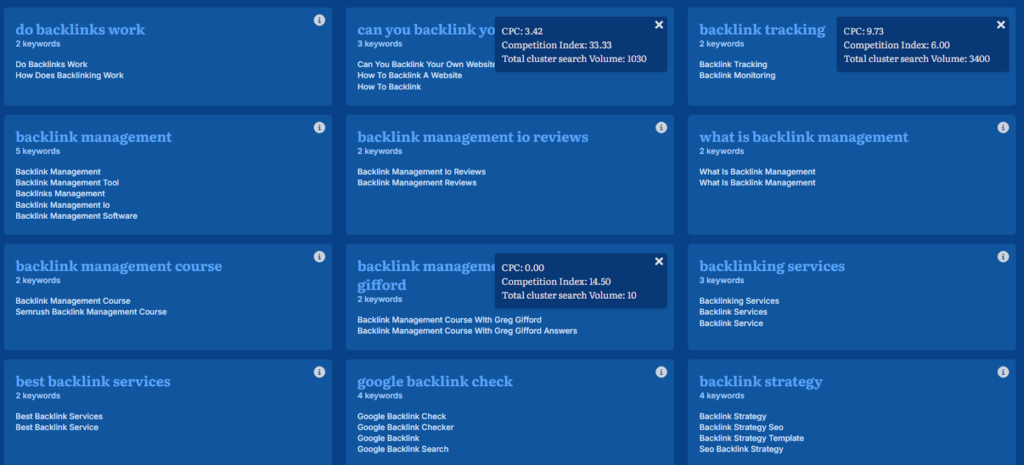
So instead of guessing what to write first, I could clearly see:
- Which topic can drive more traffic
- Which one is easier to rank
- Which one has stronger buying intent
This helps a lot while planning blog content. It stops you from creating multiple similar posts targeting the same keywords. Sometimes you realize one strong, well-structured article can cover what you were planning as 3–4 separate blogs.
Tip: You can export the sheet, import it into your spreadsheet, sort it, filter it, and even plan your content calendar from it.
That said, don’t blindly trust it. Go through the clusters yourself. You might not agree with how some keywords are grouped, and that’s okay.
Think of it as a starting point. It gives you structure, and then you refine it from there.
Note: All your previous searches and clustering projects are saved in the sidebar and never expire. You can re-download the CSV files anytime if needed.
2. Recursive Questions/Keyword Research
Another feature I found interesting was recursive keyword research.
These aren’t just normal surface-level questions. They go deeper. Sometimes other standard keyword tools don’t even pick these up.
For my “backlink management” keyword, I got around 60 recursive questions. And these weren’t repetitive. They were layered, more specific, and often the ones I hadn’t considered.
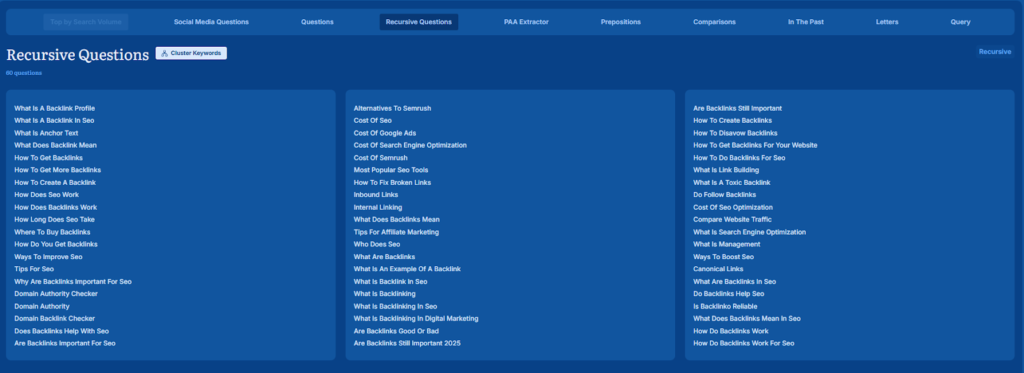
Basically, it takes an existing question and expands it into deeper related queries. So instead of just seeing “what is backlink management,” you start seeing more detailed follow-up type questions around it.
It helps you go beyond basic keyword research and actually explore the topic properly.
3. PAA Extractor
We also used the PAA Extractor tool, and it’s honestly very useful.
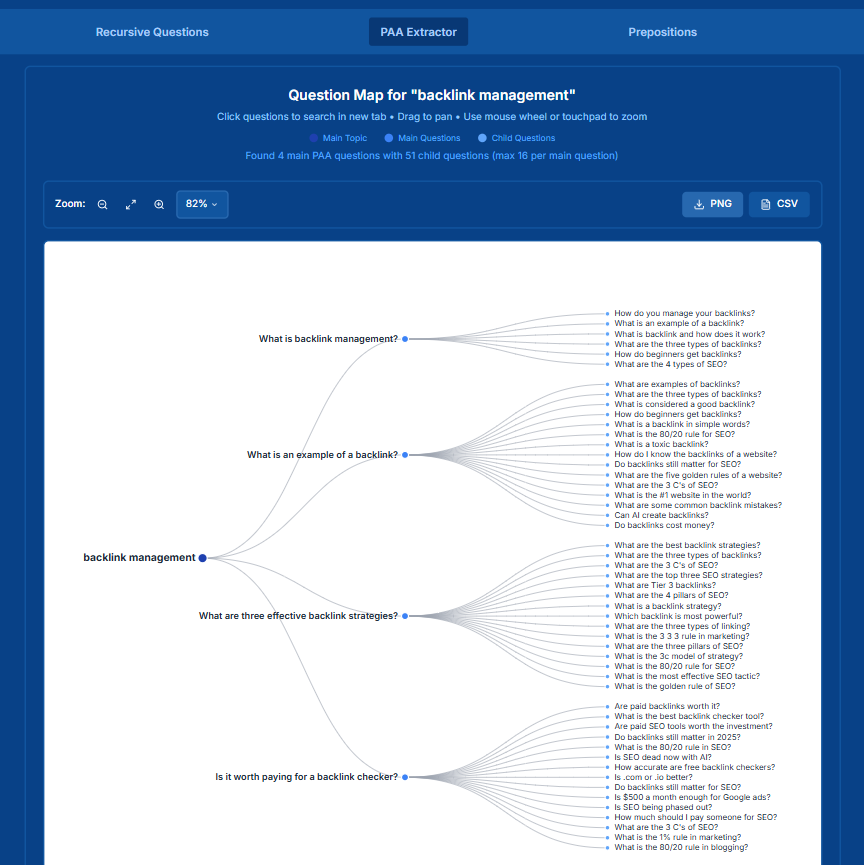
All you have to do is enter your keyword. In our case, we entered “backlink management.” Then you select the country and language, and click Analyze Questions.
It pulls the exact questions that Google is showing inside the “People Also Ask” section. Not just one layer, but two levels of PAA questions. So you get deeper related queries without manually searching and clicking multiple dropdowns on Google.
You can also download everything in a CSV file. It even shows the answers and the URLs that are currently ranking for those questions.
4. Trending Topics
Answer Socrates tracks trends across 150+ countries. So you’re not just seeing what’s trending in one location. You can check different countries and languages, which is super helpful if you’re working on global content. If a topic looks promising, you can instantly generate related questions around it.
5. Statistics Generator
Another tool I really liked inside Answer Socrates is the Statistics Generator.
I was creating content around backlink management tools, and I wanted to support my points with solid link-building stats. Adding numbers just makes the content more convincing.
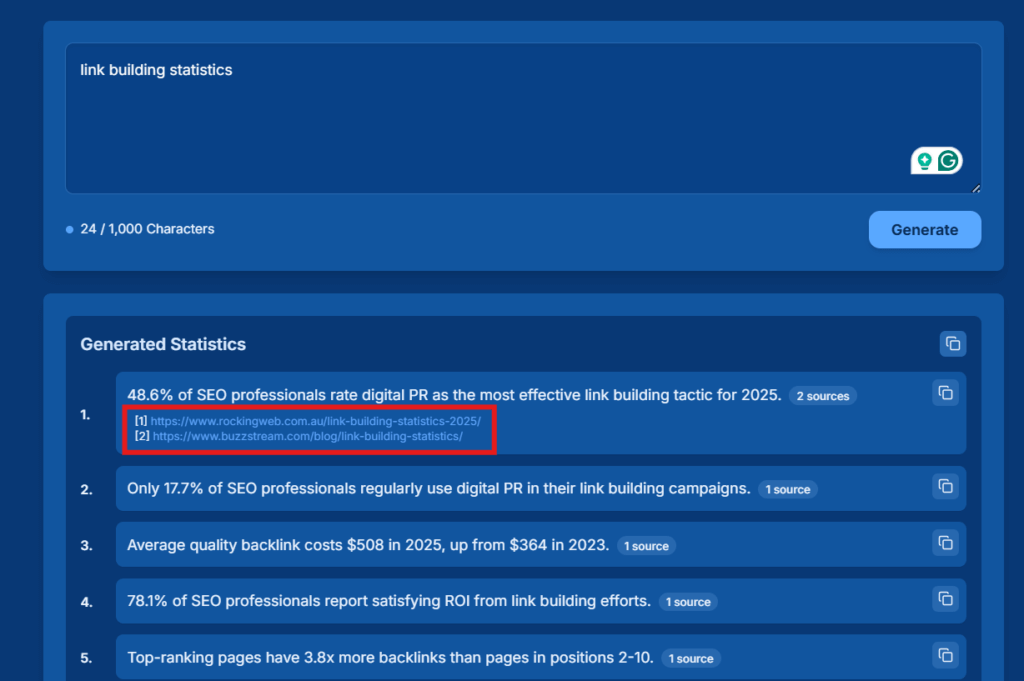
Instead of manually searching Google and opening multiple articles, I simply entered my topic in the tool and clicked generate. Within a few minutes, it gave me relevant statistics related to it.
This is useful when you’re:
- Writing blog posts
- Creating landing pages
- Recording YouTube videos
Adding data makes your content stronger and more credible.
Just make sure to double-check the sources. The tool provides references, so you can verify everything before using it. It saves a lot of time, but accuracy still matters.
6. LSI Keyword Research
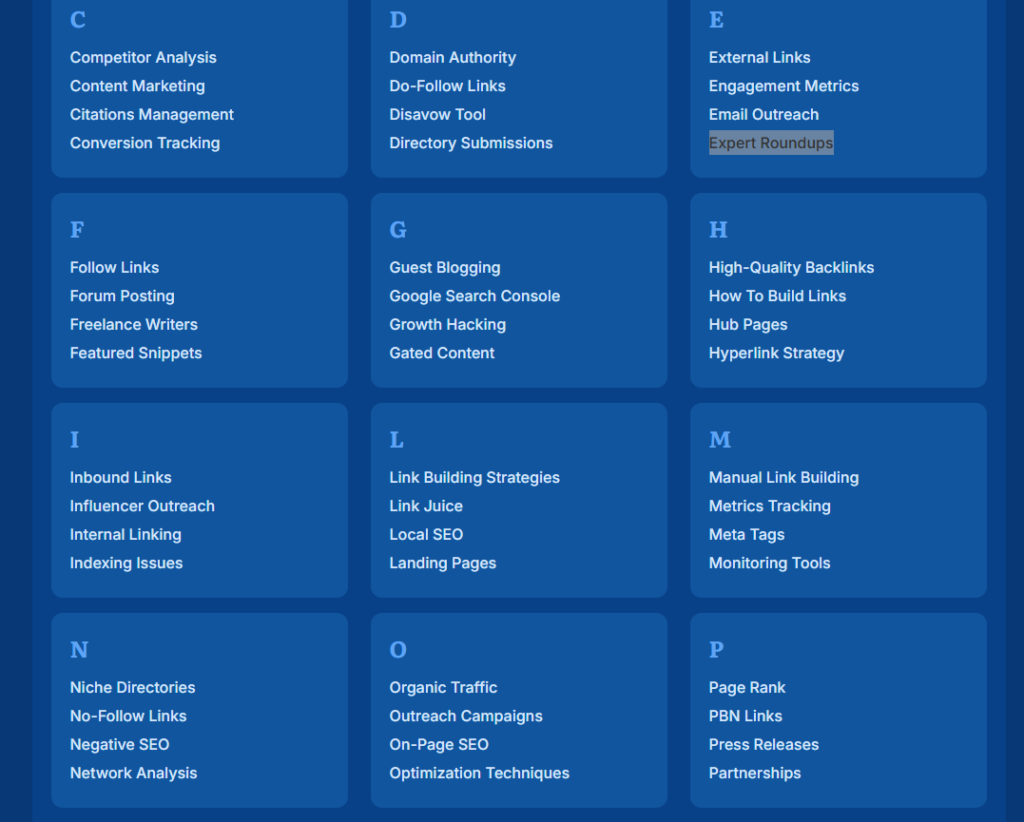
LSI keywords are simply related phrases connected to your main/ primary keyword. They help search engines understand what your content is actually about.
The tool pulls semantically related terms, instead of repeating the same keyword again and again. This matters because search engines now focus more on topical relevance, not keyword stuffing.
When I searched for “backlink management,” Answer Socrates also gave me relevant LSI keywords to support the topic properly.
7. SaaS Keyword Generator
We also tried the SaaS keyword generator from Socrates, and honestly, it felt less like a basic keyword tool and more like a structured strategy builder.
To test it, we used the example of the SaaSBacklinks website. The setup is simple. You just enter:
- Company name
- Domain name
- Industry/niche
- Core features
- Main competitors
That’s it.
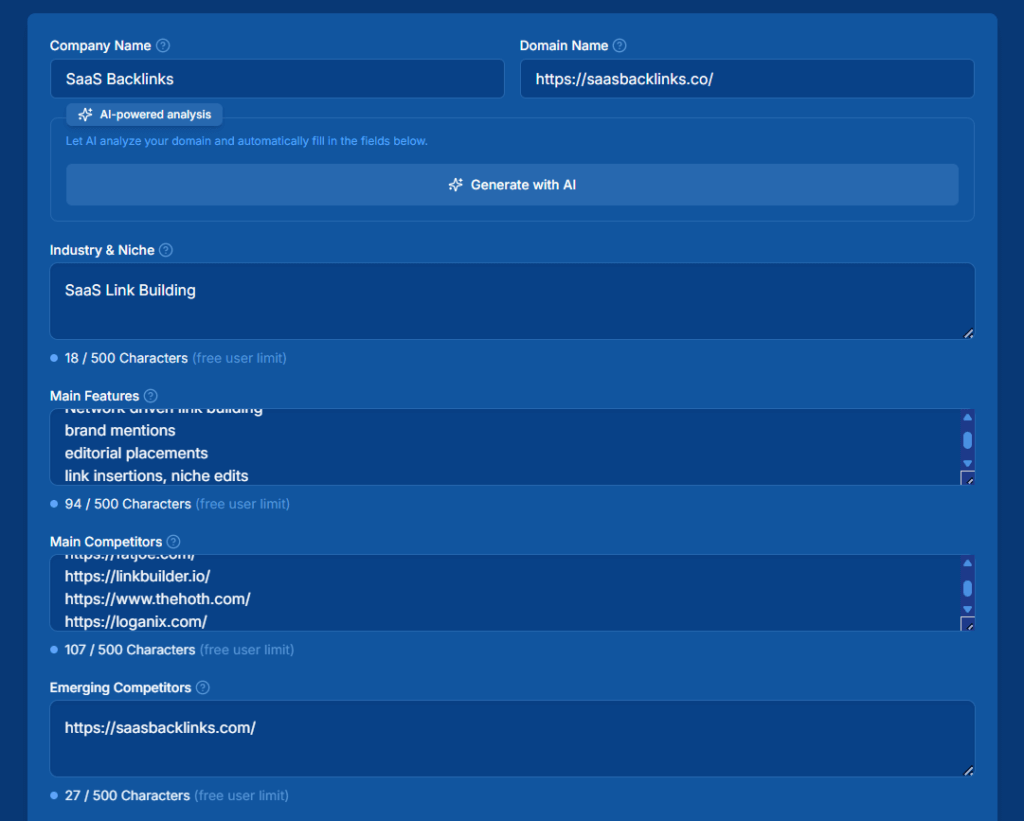
Based on this information, the tool generates highly targeted keywords across different strategic categories.
Here’s what we got:
- Industry-specific keywords
- Long-tail keywords
- Feature-focused keywords
- Problem-solving keywords
- Competitor comparison keywords
- Buyer-intent keywords
And many other grouped keyword ideas.
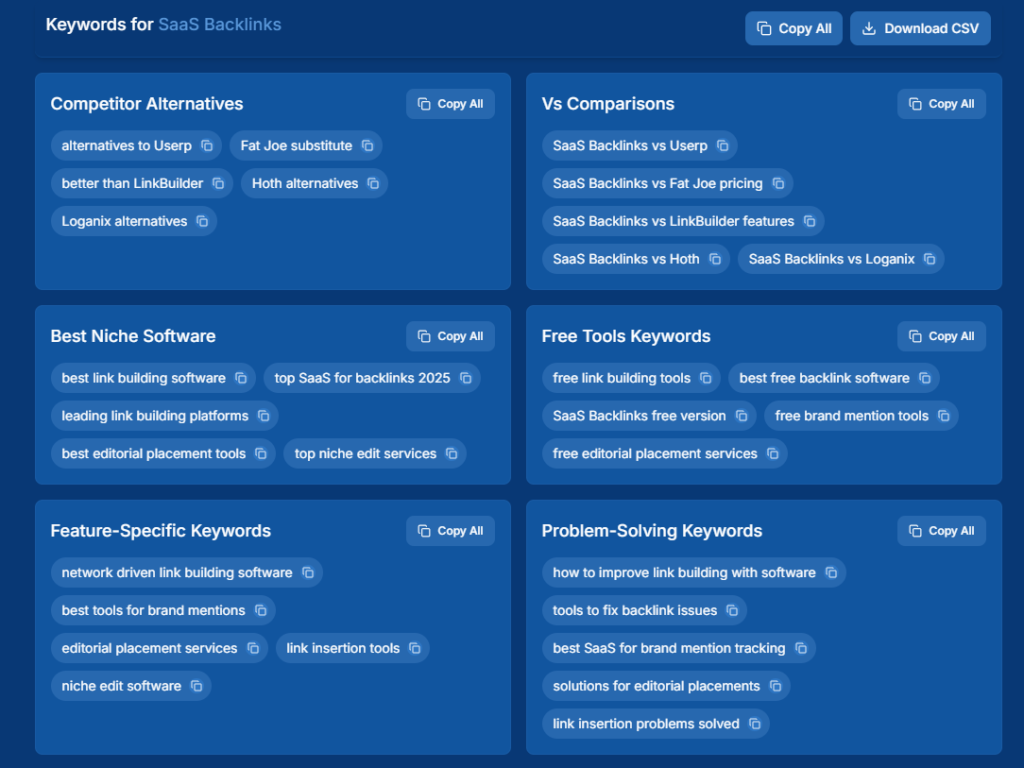
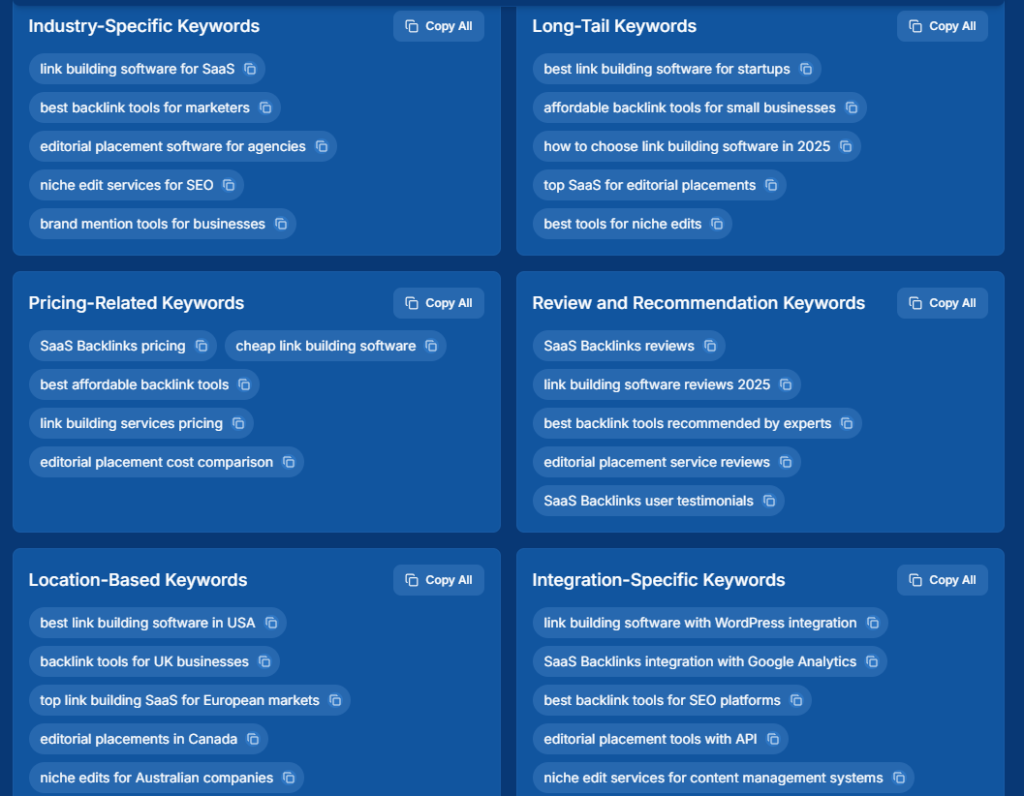
What makes it useful is clarity. Instead of randomly picking keywords, you get structured ideas for:
- Awareness-stage content
- Consideration-stage comparisons
- Decision-stage commercial pages
So overall, it’s not just generating keywords. It’s helping you plan your entire SaaS content strategy in a much more organised way.
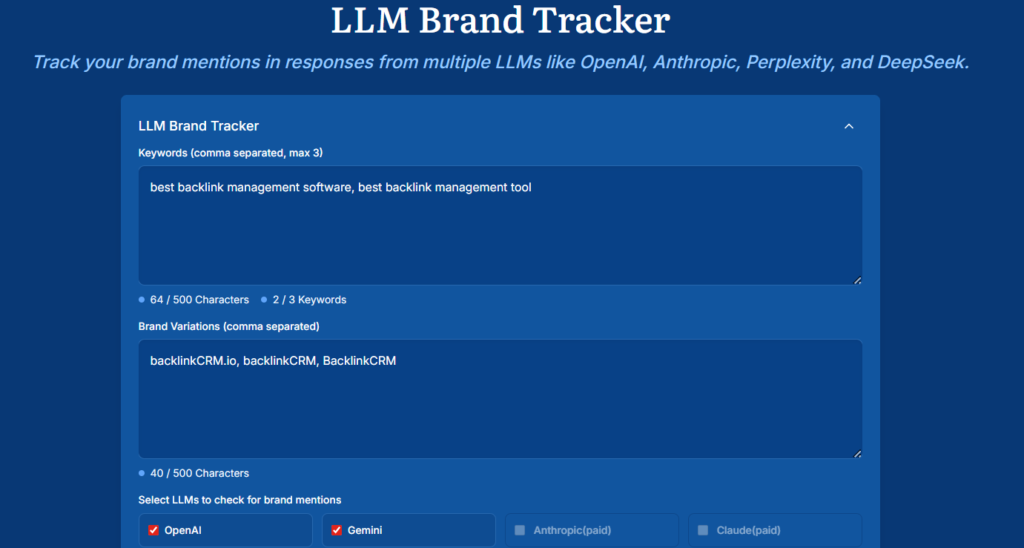
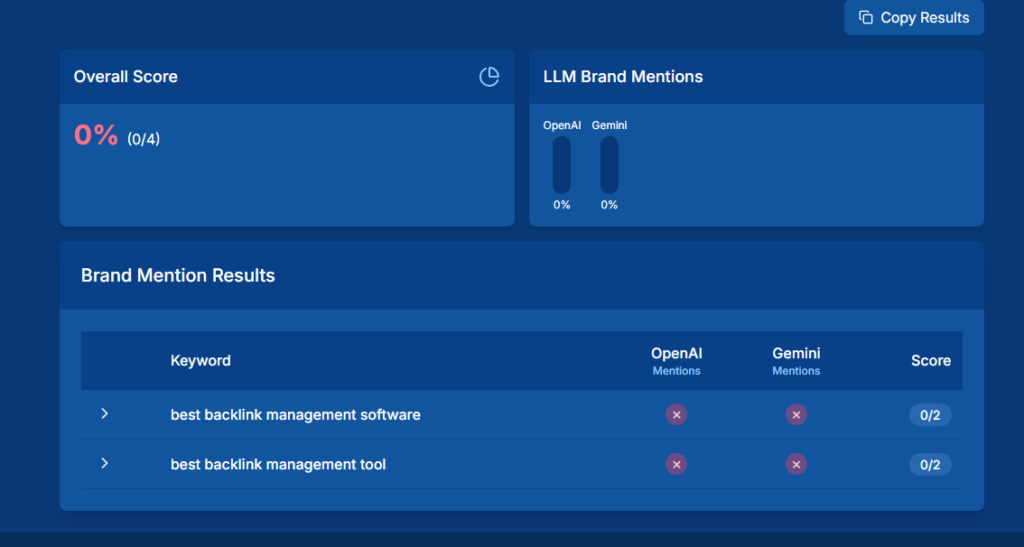
8. LLM Brand Tracker
Another interesting addition is AI visibility tracking.
It shows whether your brand is being mentioned or recommended across AI search platforms like ChatGPT, Gemini, etc.
Some Other Worth Giving a Shot Tools in Answer Socrates
1. Free Semantic Keyword Research Tool
2. Deepseek SEO Keyword Research
3. Long Tail Keyword Generator
4. Keyword Sheeter
Extra Insight about Answer Socrates
If you click the small arrow on the left side of the tool, it opens a quick menu.
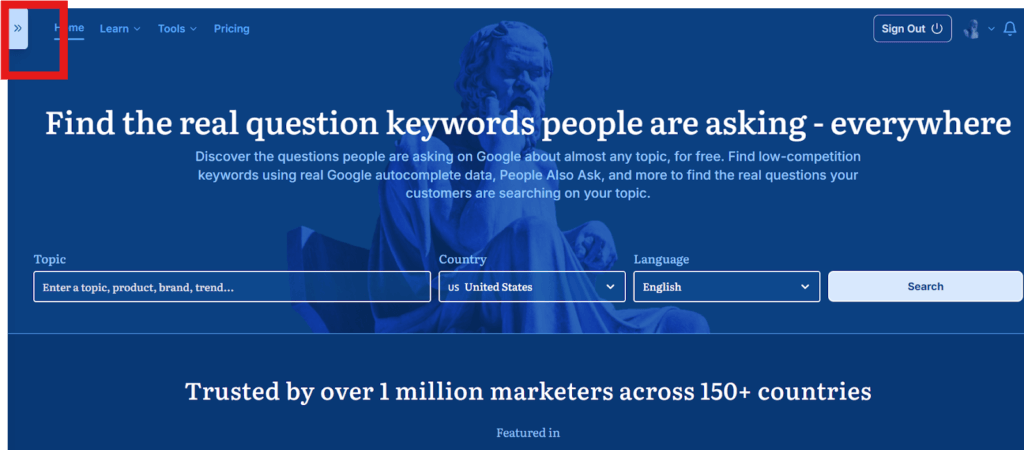
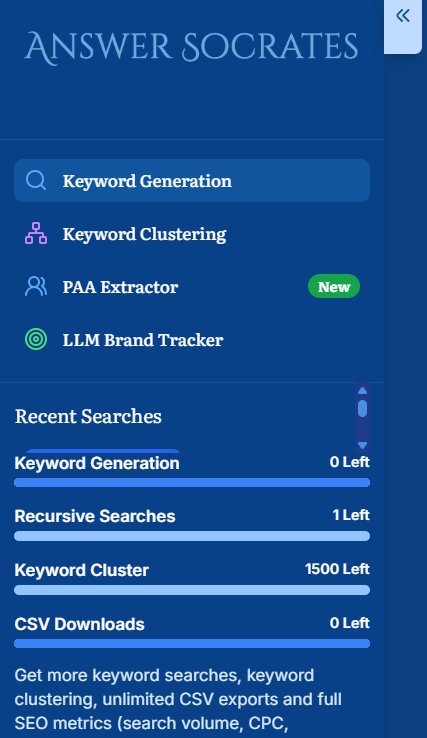
From there, you can easily access their most popular tools. You can also see your recent searches, whether it’s keyword research or clustering projects. So if you want to revisit something, you don’t have to start from scratch.
It also shows how many credits you have left for different tools based on your plan. That quick visual makes it easy to track usage without guessing.
Pros and Cons of Answer Socrates
| Pros | Cons |
| Generous free plan:3 daily searches1,500 clustering creditsaccess to core features | No deep SERP analysis like Ahrefs/Semrush |
| Clean, intuitive interface | To get proper metrics like CPC, Volume, competition data, access to a paid plan is required |
| Can use instantly without signing up (limited searches) | Daily search limits can feel restrictive for heavy users |
| Easy CSV downloads for data | Clustering occasionally mixes regional search intent (UK/US, etc.) |
| Useful for multi-platform content planning (blogs, YouTube, LinkedIn, etc.) |
Pricing & Free Plan – Is It Worth It?
You can use Answer Socrates without paying upfront. You can do one search per day without even creating an account. If you sign up for a free account, you get:
- Up to 3-5 searches per day
- 1 recursive search per day
- 1,500-3000 cluster credits per month
- Limited clustering and recursive research
- CSV export access
That’s honestly enough for freelancers, startups, or even in-house teams who just want to validate content ideas before investing in bigger SEO tools.
Now, the paid plans mainly unlock higher limits and SEO metrics like search volume, CPC, and competition data.
Here’s a simple breakdown:
Socrates Lite – $15/month
- 100 keyword searches per month
- 30 recursive searches
- 3,000 cluster credits
- SEO metrics included
- Unlimited CSV downloads
Seneca – $29/month (Most Popular)
- 500 keyword searches
- 100 recursive searches
- 12,000 cluster credits
- SEO metrics included
Aurelius – $49/month
- Unlimited keyword searches
- 500 recursive searches
- 40,000 cluster credits
- Full access to SEO metrics
The free version is great for testing and ideation.
Final Take: Where I Think Answer Socrates Fits
From my experience, Answer Socrates isn’t meant to replace your main SEO toolkit. I still need other platforms for SERP analysis, competitor analysis, and tracking performance.
But as a writer, that’s not where I struggle.
The hardest part is usually the beginning:
- What content angle should I take?
- What are people actually asking?
- How deep should this topic go?
- Am I missing subtopics?
That’s exactly where Answer Socrates fits.
It helps me think wider before I think technically. It shows real questions, clusters topics clearly, and gives structure before I even open a Google Doc.
For me, it’s less about metrics and more about clarity.
If you’re someone who writes, plans blogs, builds landing pages, or structures long-form guides, this tool helps you organise your thoughts based on real search behaviour.
And since you can use a good portion of it for free, it’s easy to test without commitment.
FAQs- Answer Socrates
1. Is Answer Socrates really free to use?
Yes, you can use Answer Socrates without paying upfront. You get limited daily searches, clustering credits, and basic keyword research features. Paid plans mainly unlock higher limits and advanced SEO metrics like search volume and CPC.
2. How is Answer Socrates different from AnswerThePublic?
Both focus on question-based keyword research, but Answer Socrates adds features like keyword clustering, recursive question research, trending insights, and CSV exports — some of which are accessible even in the free version.
3. Can Answer Socrates replace tools like Ahrefs or Semrush?
Not completely. It’s great for content ideation, search intent research, and topic discovery. But for deep SERP analysis, competitor tracking, and technical SEO insights, you’ll still need full SEO platforms.
4. Can I export keyword data from Answer Socrates?
Yes. You can download keyword research results, clustered keywords, and related data in CSV format, which makes team collaboration easier.
5. Can I just use Google’s free Keyword Planner?
Yes, you can, but it’s not really built for content planning. It hides most of the useful data, groups keywords oddly, doesn’t show trends, and there’s no clustering or deeper research.
6. Does Answer Socrates have a free plan or trial?
Yes, it has a free plan. You get 3 searches per day and 1,500 monthly clustering credits. If you upgrade to a paid plan, there’s also a 7-day money-back guarantee in case you’re not satisfied.
7. Is the free plan enough for serious SEO work?
Honestly, yes, if you use it smartly. With 3 searches a day and 1,500 monthly cluster credits, it’s more than enough for solid content planning and keyword research, especially for small to mid-sized sites.
Explore My Other Articles:
1. Best Backlink Checker Tools (Free & Paid)
2. Best SEO Monitoring Tools To Boost Your Rankings In 2026