
Over the past few months, Claude has become one of the most talked-about AI assistants.
You’ll see people recommending it on Reddit, X, LinkedIn, and founder communities. More and more founders, agency owners, freelancers, and developers are adding it to their AI stack.
And since Claude Cowork launched earlier this year, even non-technical users have started building tools and automating workflows in minutes.
With all the hype, it’s fair to wonder if the paid plan is actually worth it.
Should you stick with the free version, or is Claude Pro worth the extra $20 a month?
If you’re asking the same question, this guide breaks down what you actually get with Claude Pro, how it compares to the free plan, and whether it’s worth paying for.
What Can You Actually Do With Claude’s Free Version?
Claude’s free plan is surprisingly capable. In fact, it offers more than many people expect from a free AI tool.
With free plan, you can:
- Chat with Claude for writing, editing, brainstorming, and research.
- Access on web, iOS, Android, and desktop
- Use Claude Sonnet for most everyday tasks.
- Search the web for up-to-date information.
- Upload PDFs, documents, spreadsheets, images, and other files for analysis.
- Create and organize Projects to keep related chats and files together.
- Use Artifacts to generate and edit code, documents, charts, calculators, and simple web apps.
- Let Claude remember context across conversations, so you don’t have to repeat yourself.
- Use skills and connectors.
All this for $0. For a free plan, that’s a lot.
What’s the biggest limitation with the free plan?
The main downside of Claude’s free plan is the usage limit.
Once you reach your message limit, you’ll have to wait until your usage window resets before you can continue.
You usually get around 8-10 sessions for a 5-hours window limit. The exact number depends on how long or complex your prompts are. If you’re asking Claude to do heavy research or analyze large files, you’ll reach the limit faster.
Free also doesn’t include Claude Code, Research, Claude Science, Dashboards, Claude in Chrome, or Claude for Microsoft 365. It also doesn’t include Opus.
If you mostly write, brainstorm, and do a little research, the free plan may be all you need.
How Pro Is Actually Different (It’s Not About Getting a “Smarter” Claude)
Claude Pro doesn’t give you a completely different AI model for everyday tasks.
What you’re really paying for is fewer limits and access to extra tools that become useful if you rely on Claude every day.
Here’s a quick side-by-side before we get into the details:
| Feature | Claude Free | Claude Pro |
| Price | $0 | $20/month ($17/month billed annually) |
| Usage limits | A handful of sessions per window | ~5x more (around 45 prompts per 5-hour window) |
| Weekly limits | No | Yes |
| Fable 5.1 Model | No | Usage credits only |
| Opus Model | No | Yes |
| Sonnet and Haiku Model | Yes | Yes |
| Priority access at peak hours | No | Yes |
| Claude in Chrome | No | Yes |
| Claude Science | No | Yes |
| Extended Thinking | No | Yes |
| Research Mode | No | Yes |
| Claude Code | No | Yes |
| Claude Cowork (desktop agent) | No | Yes |
| Claude Skills | No | Yes |
| Projects | Yes (limited) | Unlimited |
| Artifacts | Yes | Yes |
| Connectors (Gmail, Drive, Slack, etc.) | Limited | Full access |
| File uploads & analysis | Yes | Yes (higher volume) |
Exact limits and model availability change over time; check Anthropic’s site for the latest.
With Claude Pro ($20/month, or $17/month billed annually), you get everything in the free plan, plus:
1. Much Higher Usage Limits
This is the biggest reason most people upgrade.
Claude Pro gives you around 5x more usage than the free plan. Almost 45 messages per 5-hour window. That means you can have longer conversations, upload more files, and work for much longer before hitting the limit.
If you use Claude throughout the day, this upgrade alone can be worth it.
2. Priority Access During Busy Hours
Free users can sometimes experience slower responses when Claude is busy.
With Pro, you get priority access. This way your chats are more likely to respond fast even during peak hours.
3. Access to Claude Opus
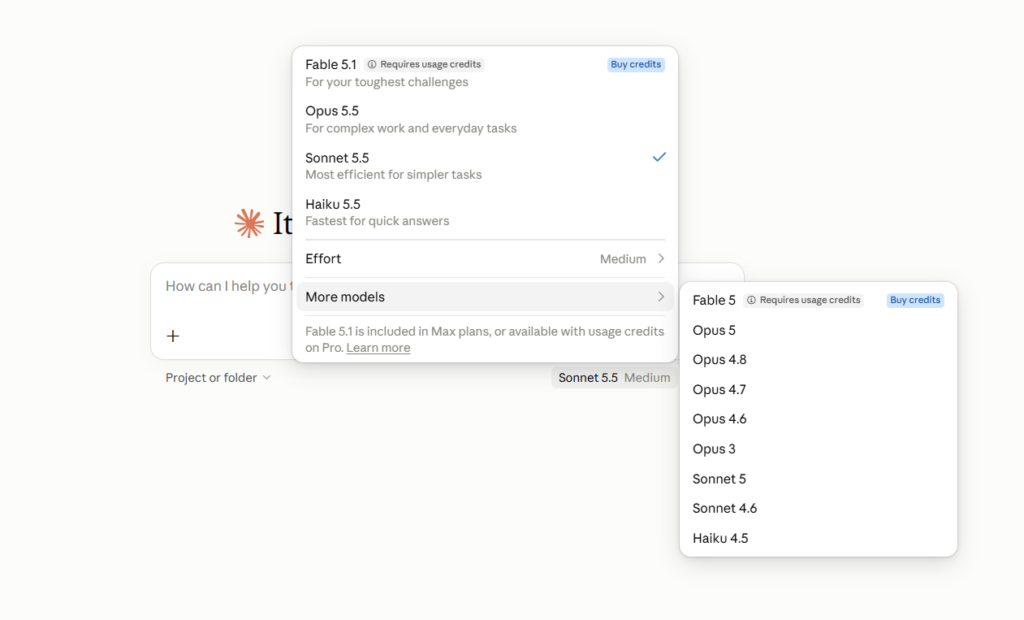
Free plan gives you access to Sonnet and Haiku models. Claude Pro adds Claude Opus 5.5 (launched Sep 22, 2026). It handles complex reasoning, detailed research, long documents, and strategy work better.
The current lineup is Fable 5.1, Opus 5.5, Sonnet 5.5, and Haiku 5.5. Fable 5.1 (launched Sep 1, 2026) is Anthropic’s model for long, complex, high-autonomy work. On Claude Pro, you use it through usage credits. Claude Max pricing plans include it up to 50% of weekly limits.
So you can pick the right model for the job.
4. Extended Thinking
Opus also supports Extended Thinking. Instead of rushing to an answer, Claude can spend more time reasoning through complex problems before responding.
This is especially useful for planning, analysis, and multi-step tasks.
5. Research Mode
Research Mode is one of the most useful Pro features.
Instead of searching the web yourself, you can ask Claude to look through multiple sources and compare the information. It then puts everything into a structured report with citations.
If your work involves market research, competitor analysis, or content research, you’ll likely find this feature useful.
6. Claude Code
Claude Code is one feature that created a lot of buzz as soon as it launched.
In fact, many developers say Claude Code alone makes the Pro subscription worth paying $20 for.
It works directly with your project, understands your codebase, and can help you debug errors. You can edit multiple files, write new features, refactor existing code, and even run common development commands.
And it’s not just for professional developers.
If you build websites, create automations, work with scripts, or simply want help making changes to existing code, Claude Code can save you a lot of time without having to do everything manually.
Note: On September 14, 2026, Claude Code’s weekly limit reportedly increased by 25%.
7. Claude Skills
Claude Skills are reusable instructions that work across all your chats.
Normally, if you want Claude to write in a certain style or follow a specific process, you have to explain it every time. Or you save it inside one project, where it only works in that project.
Skills solve that problem.
You can save your instructions, examples, rules, and best practices as a Skill.
Once it’s saved, you don’t have to paste those instructions again. Whenever you ask Claude to do a related task, it automatically follows that Skill. You don’t need to give it a prompt again and again.
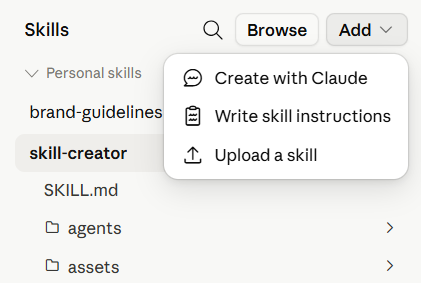
You can create a Skill using Claude’s built-in Skill Creator by describing the task and answering a few questions about your preferred workflow. Once it’s saved, Claude automatically uses that Skill whenever it recognizes a related request. You can also trigger some Skills with a slash command.
8. Agentic work with Claude (formerly Cowork)
Claude Cowork is one of the biggest additions to Claude Pro. It’s an agentic desktop tool. This means it can do much more than respond to one prompt at a time.
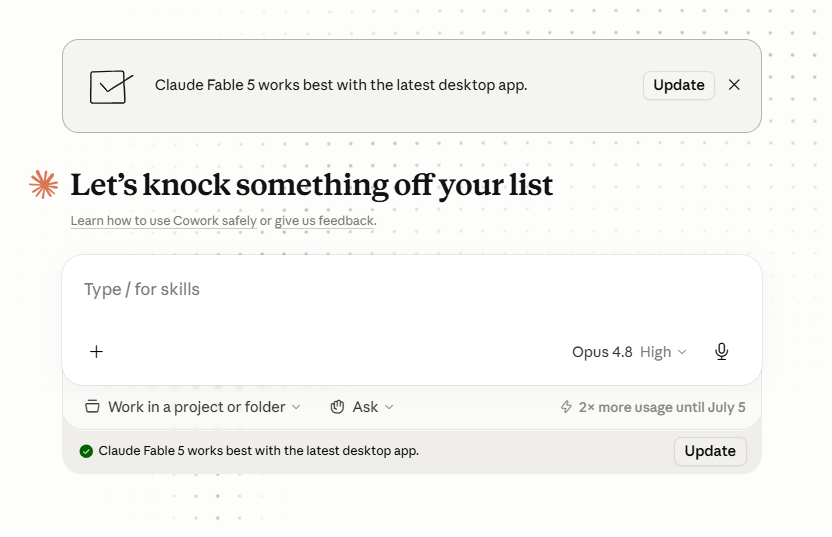
Right from your desktop, you can give it a task and let it work independently. You can give it access to folders on your computer, and it can read those files, edit them, and create new ones directly.
It also works with apps like Google Drive, Gmail, Google Calendar, Excel, PowerPoint, WordPress, and many other business tools.
9. Claude Projects
You can create unlimited Projects with Claude pro version to organize your work. Easily create separate projects for different tasks, like writing blog posts, planning content, or managing a client.
Inside a project, you can upload documents, writing guidelines, reference files, or other important information. Claude remembers these files across every chat in that project, so you don’t have to upload them or explain the same things again.
Note: Claude works best with Markdown (.md) files. So store your writing style, workflows, and reference documents in this format for better understanding and more consistent outputs.
10. Artifacts
Artifacts give your work its own dedicated workspace instead of keeping everything inside the chat. For example, if you’re building a webpage or creating a small app, Claude opens it in a separate panel where you can view and edit it easily.
11. Claude Connectors
Connect your Claude with the apps you already use. This can be Gmail, Google Drive, Slack, Notion, Microsoft 365, GitHub, and more.
Once connected, Claude can access information from those apps without you copying and pasting it into the chat. For example, you can ask Claude to summarize your unread emails, find files in Google Drive, review Slack conversations, all from a single chat.
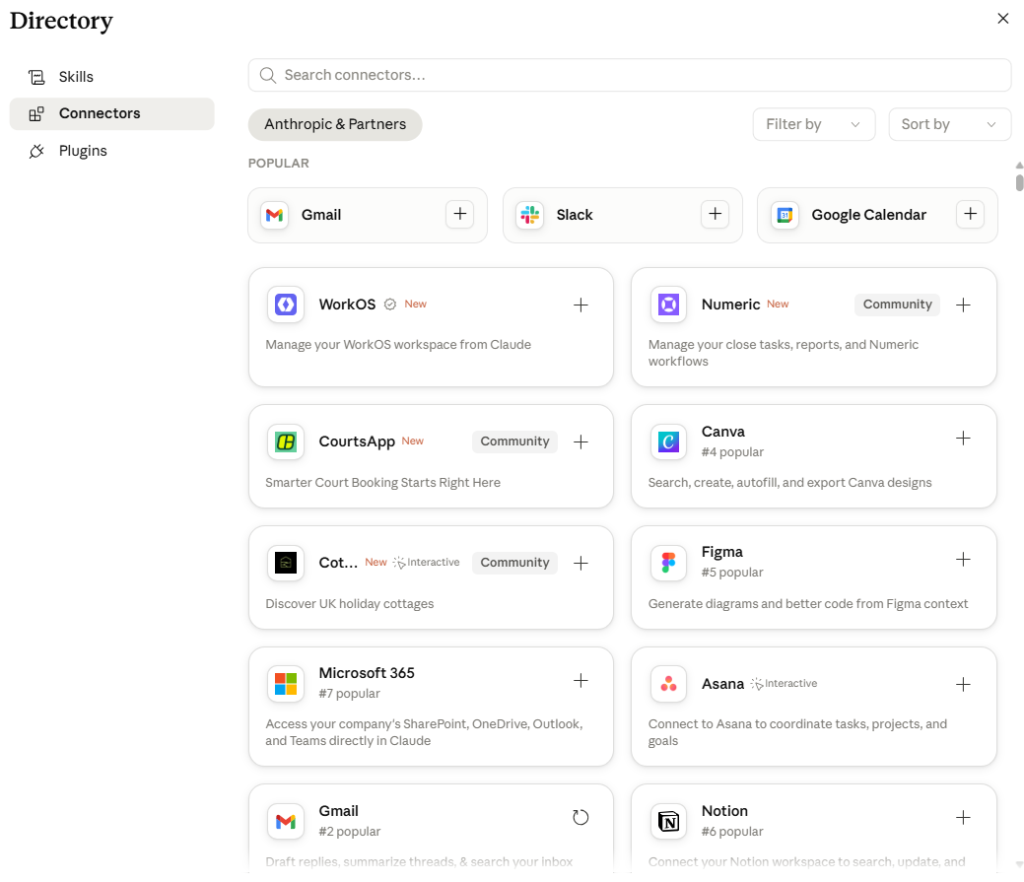
Note: Turn on only the connectors you need for a conversation. This keeps your chats focused and avoids loading unnecessary context.
How Do Claude’s Usage Limits Work?
Claude doesn’t have a fixed message limit. Instead, your usage depends on two main limits.
- 5-Hour Limit: Your usage resets in rolling five-hour sessions. Pro gives you at least 5x the Free plan’s usage.
- Weekly Limit: Paid plans also have weekly usage caps.
- One Shared Usage Pool: Whether you use Claude on the web, desktop, mobile, or Claude Code, everything counts toward the same limit. So, if you spend hours using Claude Code, you’ll have less usage left for regular chats.
- What Affects Your Usage? Your usage depends on how long your chats are, the size of your uploaded files, the model you choose, and the features you use. The more demanding your tasks, the faster you may reach your limits.
What if you hit your limit?
Hitting a limit doesn’t mean you’re stuck. You have three options:
- Wait. Your five-hour window resets on its own.
- Use usage credits. Turn them on and keep working. You pay standard API rates.
- Upgrade to Max. You get 5x or 20x the usage of Pro.
How to make your limit last longer?
A few habits can stretch your usage:
- Batch your questions. Ask several in one message, especially with long documents.
- Upload once. Don’t re-upload the same file in a chat. Claude already remembers it.
- Use Projects. Files in a Project are cached, so they count less toward your limit.
Claude Pro Pricing in 2026 (What You’ll Actually Pay)
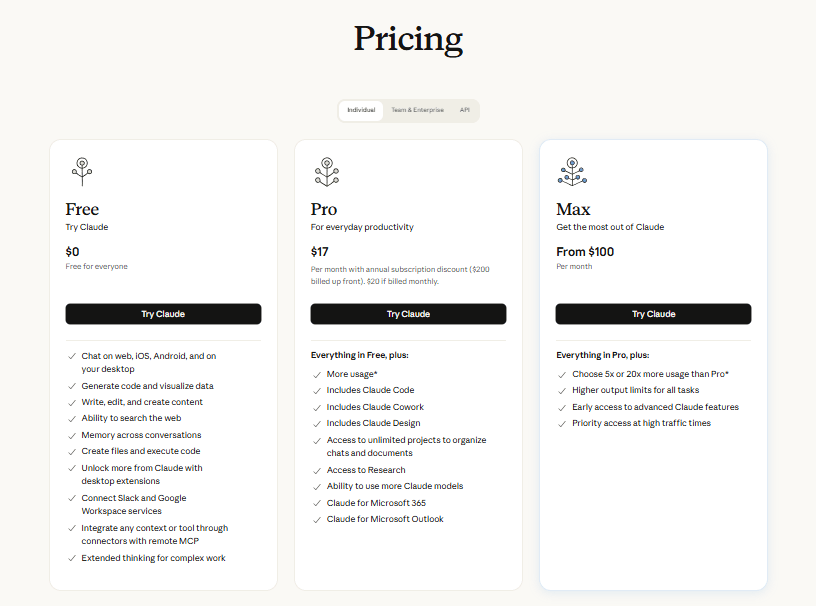
Claude offers a few different plans depending on how you use it.
| Plan | Pricing | Best For |
| Free | $0 | Trying Claude or occasional use |
| Pro | $20/month or $17/month (billed annually) | Individuals who use Claude every day |
| Max 5x | From $100/month (billed monthly) | Heavy users: 5x Pro usage, priority access, $100/month API credits |
| Max 20x | $200/month (billed monthly) | Near-constant users: 20x Pro usage, $200/month API credits |
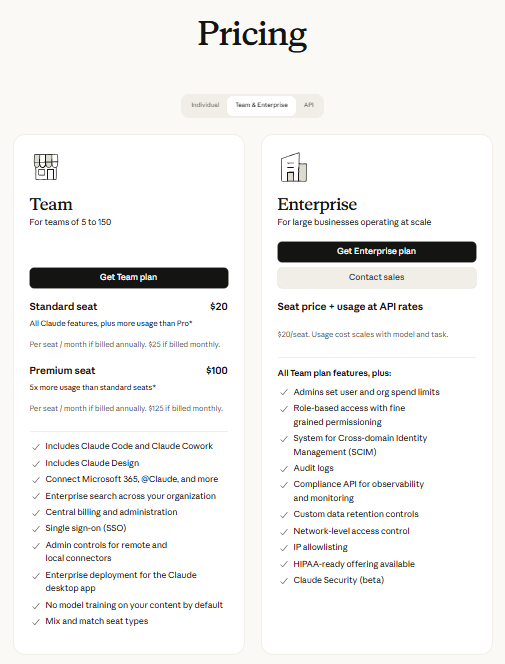
| Team standard seat | $20/seat/month billed annually, $25 monthly | Teams of 2 to 150 who need shared workspaces and admin controls |
| Team premium seat | $100/seat/month billed annually, $125 monthly | Team members who need 5x the usage of a standard seat |
| Enterprise | $20/seat/month billed annually, plus usage at API rates | Large organizations that need SSO, SCIM, audit logs, and compliance controls |
Pricing can change; confirm the latest on Anthropic’s site before subscribing.
Which Claude plan should you choose?
- Free: Best if you want to try Claude or use it now and then for simple tasks.
- Pro ($20/month): A good fit if you use Claude daily for writing, research, coding, or document analysis. You also get Claude Code, Research, and more usage. Fable 5.1 costs extra through usage credits.
- Max (from $100/month): Best if you often hit Pro’s limits. You get 5x or 20x Pro’s usage, priority access at busy times, higher output limits, API credits, and Fable 5.1 up to 50% of weekly limits.
- Team (from $20 per seat/month, billed annually): Built for teams. You get more usage than Pro, shared workspaces, SSO, central billing, and admin controls. Premium seats give 5x the usage of standard seats.
- Enterprise ($20 per seat/month plus usage at API rates): Everything in Team, plus role-based access, SCIM, audit logs, a Compliance API, custom data retention, and HIPAA-ready options.
Keep in mind: Claude has stricter usage limits than tools like ChatGPT or Gemini. In return, you get stronger reasoning and a much larger context window.
Which is better, Claude Pro or ChatGPT Pro?
Both Claude Pro and ChatGPT Plus cost $20/month. So the decision isn’t really about price. It’s about which one fits the way you work.
| Feature | Claude Pro | ChatGPT Pro/Plus |
| Monthly price | $20 | $20 |
| Best for | Writing, research, coding, long documents | Everyday AI, image generation, voice, productivity |
| Models | Sonnet, Opus, Haiku, Fable | GPT-5 and other OpenAI models |
| Context window | Larger | Smaller |
| Coding | Excellent (Claude Code) | Excellent |
| Research | Research Mode | Deep Research |
| Automation | Claude Cowork helps automate multi-step desktop workflows | AI agents, custom GPTs, and workflow automation |
| Extra Features | Projects, Skills, Artifacts, Connectors | Image generation, voice mode, Canvas, custom GPTs |
| Usage Limits | 45 messages per 5 hour | 160 messages per 3 hour |
Pick Claude Pro if you value deep reasoning, coding, and automation.
Pick ChatGPT Plus if you want the widest feature set and more relaxed limits.
Many power users end up using both for different kinds of work.
Final Verdict: Is Claude Pro Worth It?
For daily users, yes. If Claude is part of your everyday workflow, especially for writing, research, coding, or automation, $20/month is easy to justify.
The higher limits alone remove the biggest friction of the free plan. Plus, features like Claude Code, Cowork, Research Mode, and Skills genuinely change how much you can get done.
If you’re a light or occasional user, no. The free plan is generous enough that you won’t feel limited, and paying $20/month wouldn’t unlock much you’d actually use.
It’s best to start free. Pay attention to how often you hit the usage wall or wish you had Claude Code and Cowork. The day that friction becomes a regular annoyance is the day Pro pays for itself.
Frequently Asked Questions
1. Can I cancel Claude Pro anytime?
Yes. Claude Pro is a month-to-month subscription (or annual if you choose that option). You can cancel whenever you like and keep access until the end of your billing period.
2. Is there a free trial of Claude Pro?
Anthropic doesn’t typically offer a standalone Pro trial. The free plan is capable enough to act as a long-term test drive before you decide to upgrade.
3. What’s the difference between Claude Pro and Claude Max?
Pro ($20/month) suits daily individual use. Max (from $100/month) is for heavy users who keep hitting Pro’s limits, offering roughly 5x or 20x the usage depending on the tier.
4. Is Claude Cowork free?
No. Claude Cowork is only available with Claude’s paid plans. It’s not included in the free version.
5. Can Claude generate images?
No. Claude can understand and analyze images, but it can’t generate images on its own. If image generation is important to you, ChatGPT or Gemini may be a better choice.
6. Is Claude Code better than ChatGPT for coding?
It depends on what you’re working on. Claude Code is better if you want help with an entire codebase, editing multiple files, or automating development tasks. ChatGPT is a good choice for quick coding questions, explanations, and smaller programming tasks.
7. Does Claude Pro include Claude Code and Claude Cowork?
Yes. Both are available on Pro, along with Skills, Research Mode, Projects, and Connectors.

